Automate the processes you still do by hand
One keeps customers, messages, quotes and activities in one place. On top of that data you build automations that start from an event and handle the rest, with AI reading messages and sending the work to the right person.
Start from a template
Ready-made automations for sales, marketing and support, adapted to your case.
AI inside the flow
It reads the message, picks a label and sends the work down the right path.
Every run on record
See what each step did and, if something stops, why.
Every day someone copies, remembers and chases by hand
They are small, repeated tasks, and they hold up only as long as someone remembers them.
Everything gets copied by hand
A request comes in on WhatsApp or from the website, and someone types it into the CRM, then a spreadsheet, then a reminder.
Follow-ups depend on memory
The quote that went out, the customer to call back, the contact from the form: if nobody writes it down, it stays there.
The rules live in people's heads
Who takes the new contact, when the manager is told, what happens with a complaint. When that person is on holiday, everything stops.
Nobody sees what has stalled
Deals stuck for months come up in a meeting, when it is already too late.
An event, a series of steps, a log
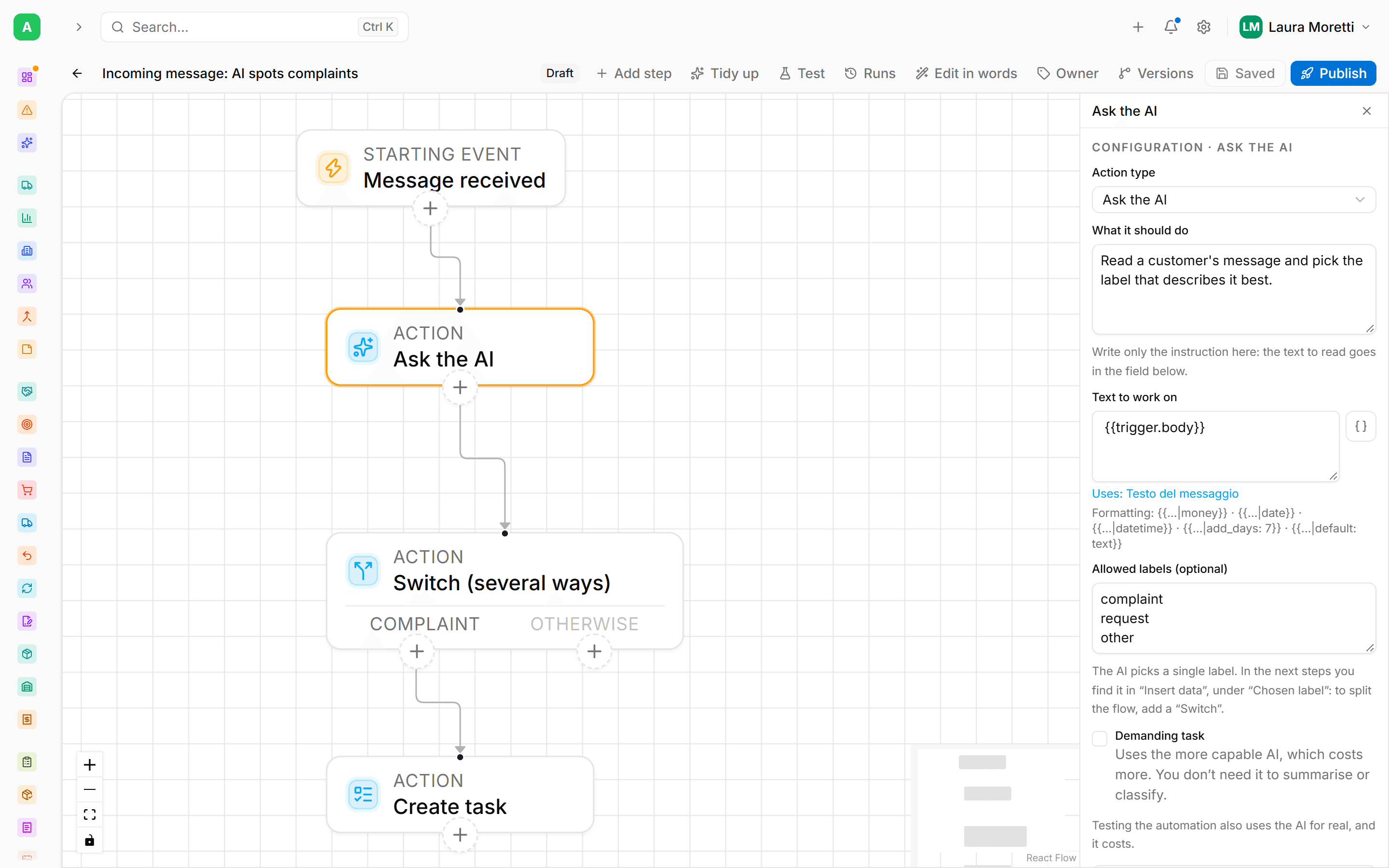
Every automation starts from something that happens in the business and runs the steps you set, in the order you chose.
Pick the event
A message received, a form submitted, a quote sent or accepted, a contact joining a campaign, an incoming email.
Add the steps
Create the record, assign the owner, send the email, wait three days, open a call-back task. A condition splits the flow into different paths.
Test it and switch it on
You test it before publishing. Afterwards every run stays in the log with the outcome of each step, and for each step you decide what happens if it fails.
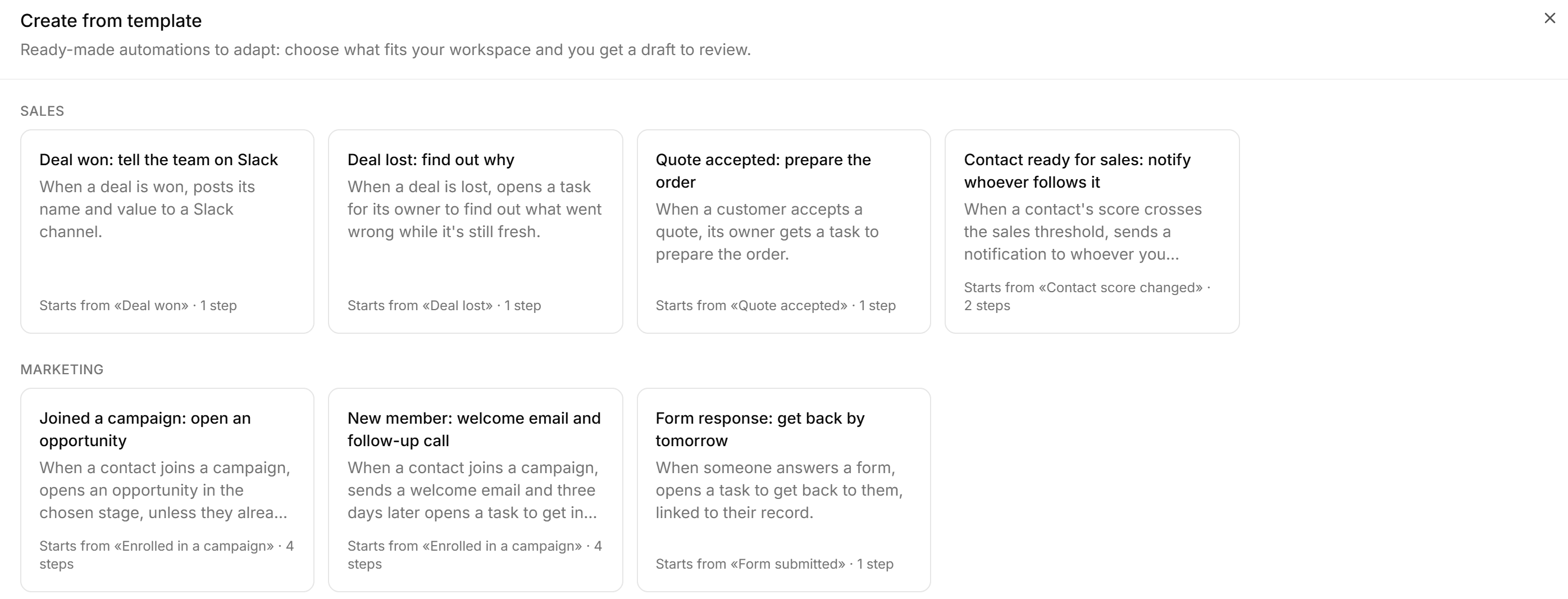
Start from a ready-made automation
Sales, marketing and support each have their templates. Pick the one you need, fill in a couple of fields and you get a draft that is switched off, ready to review in the builder before you turn it on.
If there is no template for it, describe the process in words: One drafts the steps and you check them.
The AI reads the message, the flow decides where it goes
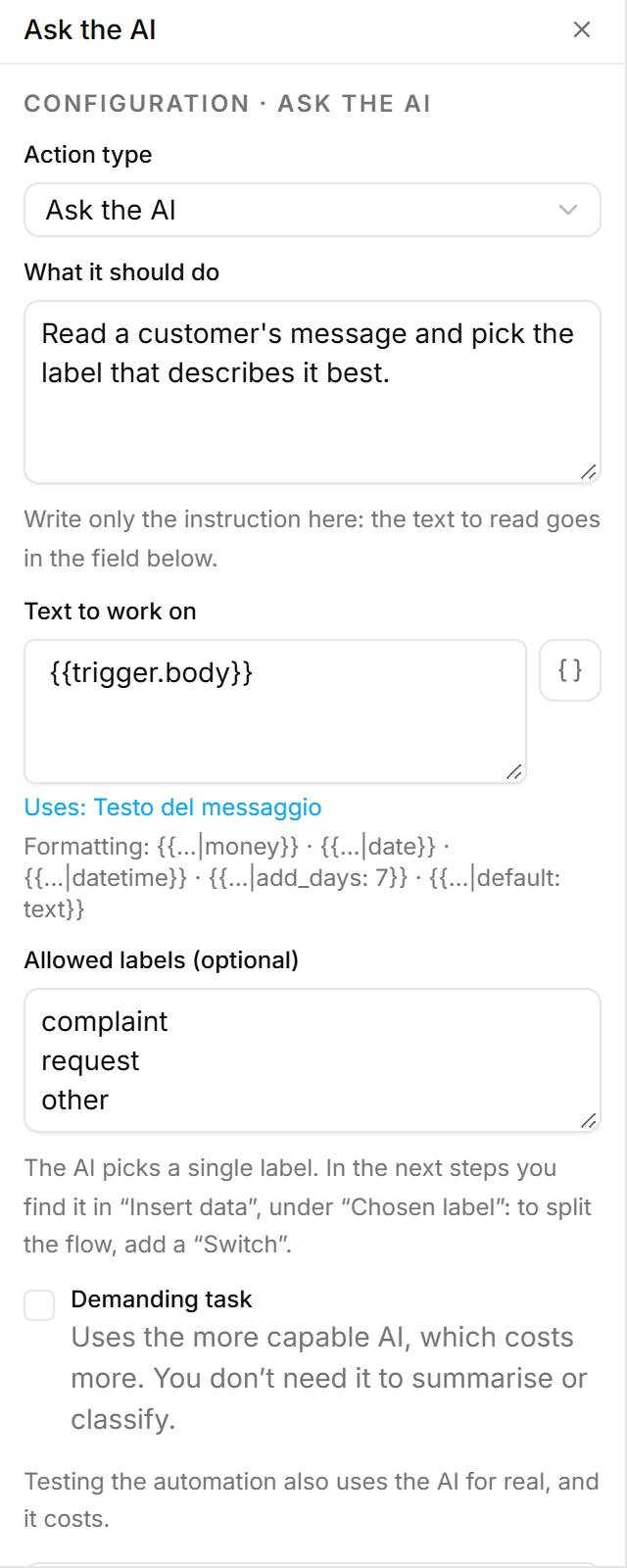
The «Ask the AI» step gets an instruction in plain language and the list of allowed labels. It reads the text, picks one, and the next step routes it: the complaint to whoever handles it, everything else where it belongs.
Instructions in plain language
Write what it should do the way you would explain it to a colleague.
Labels you decide
The AI only picks among the ones you listed, so the flow always knows what to expect.
Flows that start from what the customer asks
An automation can start when a message is a quote request, an appointment or a complaint.
Agents that pick up the work left behind
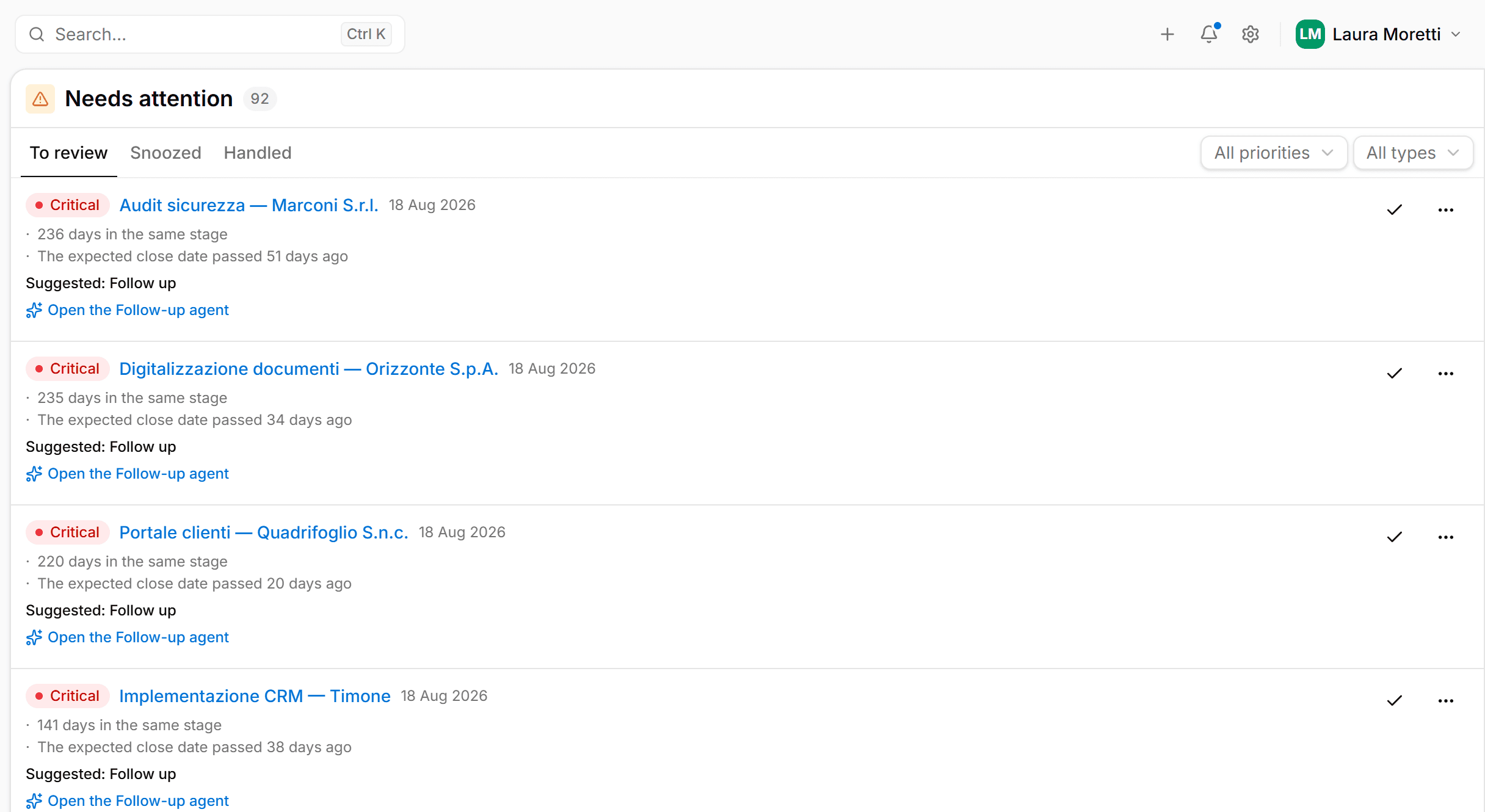
«Needs attention» gathers stalled deals, unanswered quotes and missed deadlines, each with a suggested action. From there you open the agent, which works with the instructions and tools you gave it.
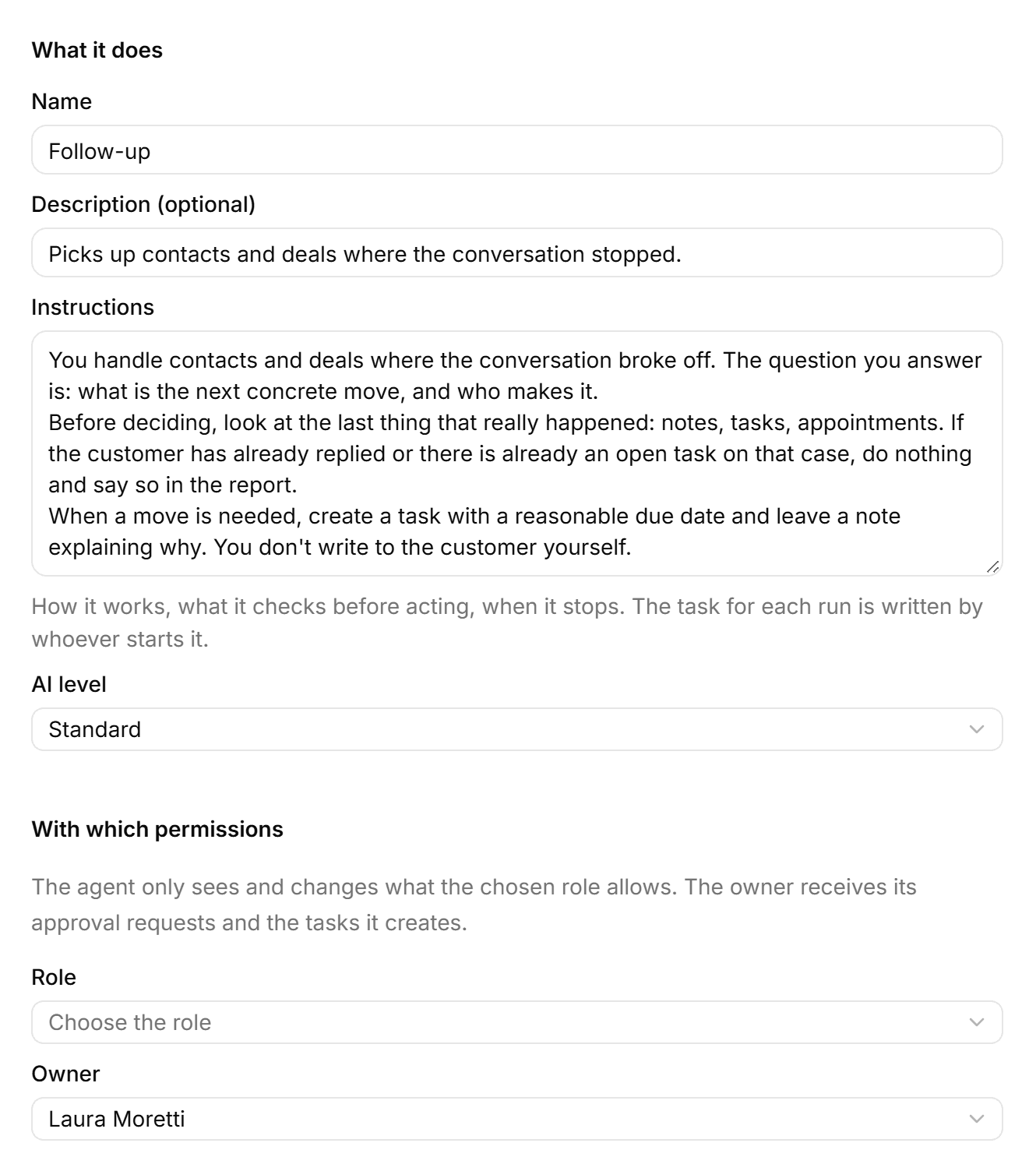
Instructions you write
What to check before acting and when to stop. The Follow-up agent, for example, does not write to the customer: it creates the task and leaves a note explaining why.
A role's permissions
The agent sees and changes only what its assigned role allows.
An owner
Approval requests and the tasks the agent creates go to a person.
What One does on its own, on top of your flows
Some jobs are ready to switch on: assigning new records, moving a contact to the next stage when an opportunity is created or won, adding up lead scores, asking people who fill in a form to confirm. Each rule is set from its own page and can start your automations.
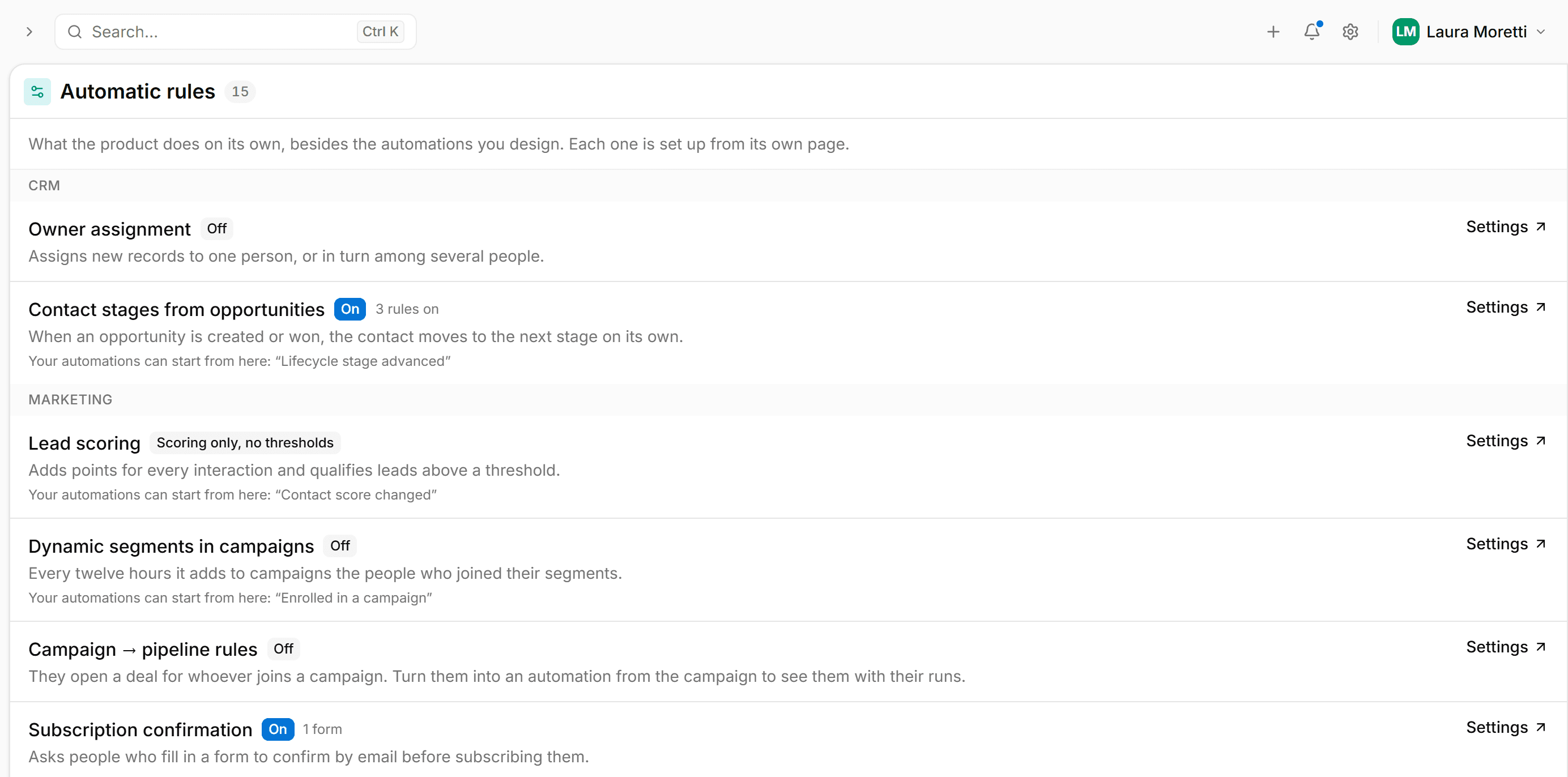
Automations work on real data
Customers, sales, messages and activities live in the same system. A flow reads a contact, opens an opportunity and assigns a task without going through another program.
CRM
Includes: Companies · Contacts · Notes · Duplicates
Sales
Includes: Opportunities · Quotes · Subscriptions · Contracts
Messaging and marketing
Includes: Inbox · Campaigns · Segments · Forms
Activities
Includes: Calendar · Tasks · Approvals
Documents
Includes: Archive · Content search
Everyone sees what they should
You decide who reads and who edits, and every change leaves a trace.
Roles and permissions
Read and edit rights are set per role, down to a single field on a record.
Data kept apart per company
Each company has its own space, isolated from every other customer's.
Change log
Every change is recorded with who made it and when.
Contact consent
Emails and messages only go to people who agreed to receive them. Forms ask for double opt-in.
From the demo to your first live automation
We handle the technical side. All we ask is that you tell us how you work today.
A demo on your processes
In half an hour we look at a process your team does by hand and show you how it becomes an automation in One.
Setup and import
We bring in contacts and data from your files, set up roles and permissions and build the first automations with you.
Go-live and training
We switch the automations on and train the people who will use them every day. After go-live we stay your point of contact.
Questions about One
If yours is not here, send it to us: we reply within one business day.
Book a demo of One
Half an hour on a video call. Tell us about a process your team does by hand and we show you how it becomes an automation.
We write back within one business day
To set the date and time of the demo.
Half an hour on your process
You see One working on a case from your business, not on a slide deck.
A written proposal
If it convinces you, you get what to switch on, timing and price, and decide in your own time.
Data submitted through this form is used only to reply to your enquiry.